A customer joins the queue at 5:57. The service desk closes at 6:00. Three minutes should not turn into an invisible wait with nobody left to answer.
Treat queue closing and an empty staff roster as live routing events. Decide what the customer should be offered, configure a separate overflow playbook for each event, and test the transition with a conversation already waiting. The customer needs a truthful next step and your team needs proof that the work still has an owner.
Microsoft now documents two relevant Dynamics 365 Contact Center scenarios. One applies when a queue moves out of operating hours while conversations are waiting. The other applies when every representative assigned to the queue is signed out. In either case, an administrator can run a configured overflow action instead of leaving the customer in place.
Treat closing as an event not a timetable
Operating hours answer whether new work should enter a queue. They do not settle what happens to work that entered moments earlier. A conversation can remain open while the people expected to handle it disappear.
- Waiting work is includedStart the test before closing so the rule proves what happens to an existing conversation.
- The trigger is explicitSeparate scheduled closing from the condition where every assigned representative is signed out.
- The destination can answerVerify that the callback, voicemail, or alternate queue is genuinely available.
- The customer hears the truthMatch the message and expected response time to the coverage that actually exists.
- Recovery has an ownerName who checks failed overflow actions, diagnostics, and still-waiting conversations.
Microsoft says conversation orchestration monitors changing conditions throughout a conversation. Its supported overflow conditions include queue operating hours, sign-in status, representative availability, wait time, and queue position. The dedicated feature guidance describes two triggers for already-waiting work: a queue moving out of operating hours, and all assigned representatives being signed out. Those are related, but they are not the same failure.
A planned close is predictable. An empty roster can happen at noon because of a mistaken schedule or mass logout. Keep the triggers separate so an operator can tell which condition fired.
This is also where a shared support inbox helps. The routing system may move the conversation, but the receiving team still needs the history, current state, and original wait time.
Choose the promise before the action
Do not start with the overflow menu. Start with the sentence the customer should be able to trust.
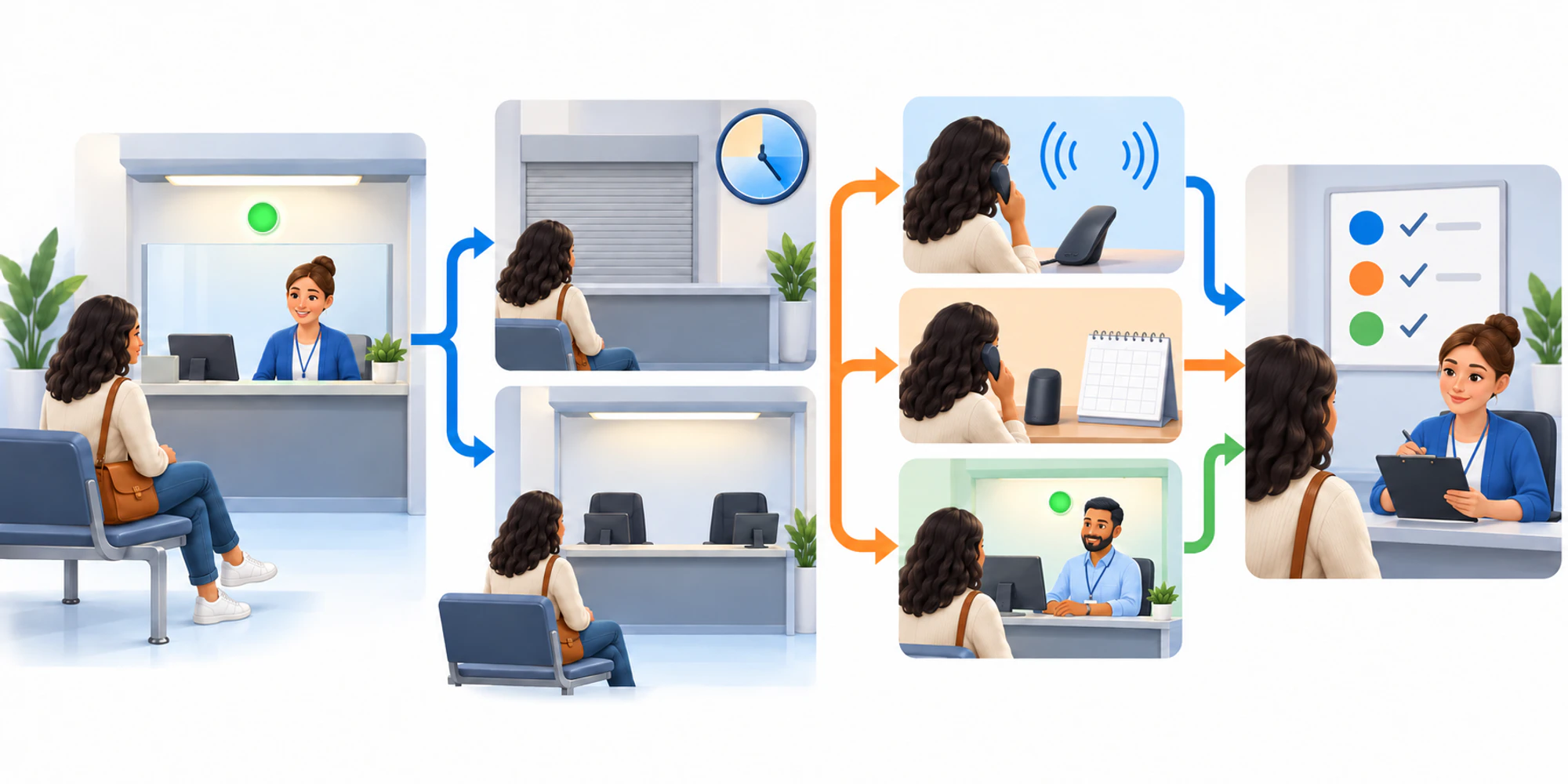
For voice, the promise might be a callback, voicemail review, or transfer. For messaging, it may be a staffed queue or an acknowledgement with a named response window. The right choice depends on whether the destination can really accept the work.
| Trigger | Customer promise | Suitable fallback | Evidence to keep |
|---|---|---|---|
| Queue reaches closing time | You will not keep waiting in a closed line | Callback, voicemail, or an open queue | Trigger time, chosen action, new owner |
| Every representative signs out | Your request is still active despite the staffing gap | Available queue or controlled callback | Sign-out state, fallback result, recovery owner |
| Fallback destination is unavailable | We will not send you into another dead end | Honest message and owned follow-up | Failed route, customer notice, manual task |
| Playbook does not run | A person will recover the waiting work | Supervisor review and manual transfer | Diagnostic record, correction, retest |
This is an operating decision. If the alternate queue closes at the same time, transferring there only moves the silence. If voicemail waits until the next business day, say that.
Build one playbook for each failure state
Microsoft's current conversation orchestration configuration guide describes guided overflow templates for a queue going out of operating hours and for all users being logged out. Conversation orchestration is currently documented as a production-ready preview for voice and messaging, with licensing, roles, unified routing, channel, workstream, and queue prerequisites.
Build the narrowest playbook that expresses one trigger, one set of conditions, and one outcome. Select the intended queues. Confirm that it is active, not left as a draft. Review other active playbooks for the same queues because the first action may change whether another rule still has work to process.
Natural language is the authoring method, not the final control. Microsoft says the published instruction becomes structured runtime form. Read that result, keep scope small, and avoid combining several triggers and fallbacks in one vague paragraph. A controlled automation workflow should be easy to explain to its supervisor.
Test the transition while someone is waiting
A test that starts after the queue has closed misses the risky moment. Put a synthetic conversation into the queue while it is open, leave it unassigned, and then cross the boundary.
Run at least these cases:
- the queue closes with one conversation waiting;
- every assigned representative signs out while the queue remains within operating hours;
- the preferred fallback is available;
- the preferred fallback is unavailable;
- another wait-time or priority playbook is also eligible; and
- the customer disconnects or replies during the transition.
For each case, capture the trigger, action, customer message, destination, owner, timestamps, and final state. Microsoft's guide provides conversation diagnostics and recommends checking status, selected queues, channel, and availability conditions when overflow does not trigger.
Use synthetic content for the first test, confirm the route, and repeat after every edit. The same discipline belongs in an AI handoff design: automation works only when the receiving human can see why the work arrived and what happened.
Give recovery to a named owner
Every automatic path needs a manual recovery path. Name the person or role that watches for waiting conversations after close, failed overflow actions, and queues with no signed-in representatives. Define how quickly they must inspect the issue and what they may change.
The recovery owner should not reset the conversation's age or erase the failed route. Preserve entry time, customer messages, attempted action, and destination. That evidence separates a configuration problem from a staffing problem.
A customer record can hold durable context, while support operations need the live owner and next action. Keep those responsibilities connected. Access to routing rules and diagnostics should also follow your security controls, especially when several teams share queues.
DripTell can help a team keep cross-channel context, ownership, and automated follow-up visible after a handoff. It does not make an unreachable destination reachable. The operating promise still has to match real coverage.
Frequently Asked Questions
Does closing time automatically move waiting conversations
Not safely by assumption. Configure and publish the out-of-operating-hours overflow playbook, then test it with a conversation already waiting. Microsoft documents this as a specific conversation orchestration scenario.
What is different when every representative signs out
The queue may still be within its operating hours. The all-users-logged-out trigger can run an immediate configured fallback instead of waiting for a normal in-queue timer, so test it separately from scheduled closing.
Can one playbook cover voice and messaging
Conversation orchestration supports voice and messaging, but channel context and fallback options differ. Keep scope explicit and test each selected channel with its real destination and customer message.
Should callback always be the fallback
No. Use callback only when the callback path has capacity, ownership, and a truthful response expectation. Voicemail or an available alternate queue may be better. The Microsoft feature description presents these as choices, not a universal ranking.
Want help applying this guide?Ask the DripTell team
From reading to action
Want help applying this to your business?
Share your details. We will read the article you are on and start with a useful answer for your team.
DripTell Editorial
Practical guidance reviewed by the DripTell product and customer workflow team.
See how DripTell checks product claims, uses primary sources and handles corrections.
Editorial and source policy