Public website

Customer conversation platform

Every conversation. One clear next step.

DripTell brings WhatsApp, Instagram, Messenger, Telegram and web chat into one workspace, with shared ownership, customer context, automation and AI assistance.

You are viewing the compatibility version because this browser does not support the modern website presentation. This is the public DripTell website; no customer workspace or account data is shown.


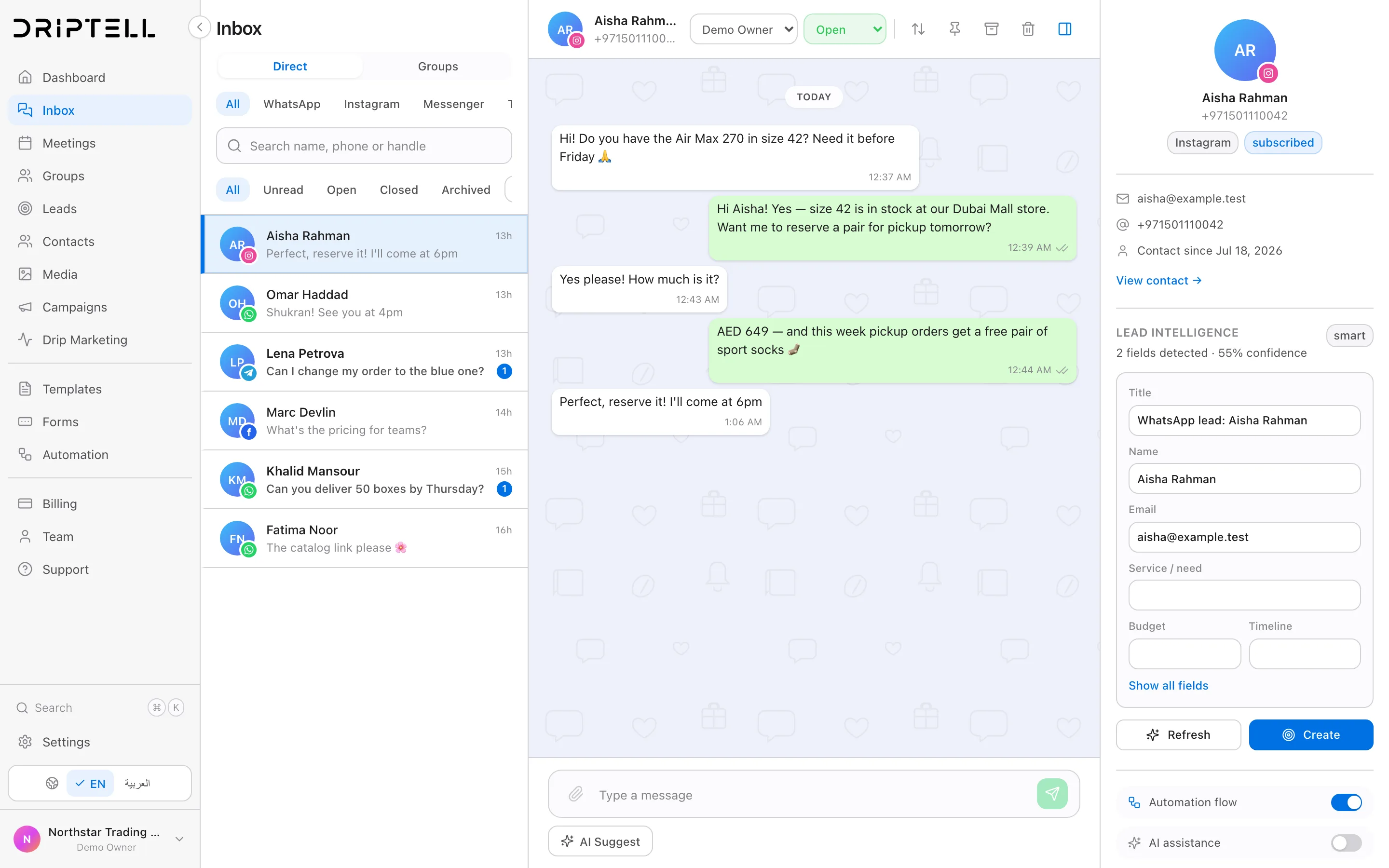
Manage every customer channel in one omnichannel support inbox.

A customer can move from WhatsApp to Instagram or web chat while the team keeps the same person, history, owner and next action in view.

app.driptell.com
Manage every customer channel in one omnichannel support inbox.
Real DripTell product view

Check who owns the next reply

A shared inbox gives a team one place to work on connected customer conversations. That does not remove the need for ownership. Before choosing an inbox, test whether another teammate can take over without losing the original question, private notes or the next action.

For an illustrative demo, have one test customer ask about a return. Assign the conversation to one teammate, add a private note and transfer it to another. The second teammate should continue from that note without asking the customer to explain the return again.

Check who owns the next reply
Test stepA useful result
Two teammates open the same conversationBoth can identify who should reply before sending competing answers.
The conversation changes ownerThe new owner can see the customer's messages and the agreed next action.
An internal note is addedThe teammate can use it and the customer does not receive it as a message.
A resolved conversation receives another messageThe team can find the new work and verify the configured reopening or routing behavior.

Conversation history is not the same as an immutable audit log, a record of who changed what that cannot be silently rewritten. If you need administrator events, exports, a promised storage period or proof of later changes, verify each requirement separately. A polished demo is not proof that a legal or audit requirement is met.

One working queue, not nine disconnected inboxes.

New messages from every connected channel enter the same queue. Filter by channel, owner, unread state, status or team without losing the customer record behind the conversation.

Route conversations by team, language, market or customer intent

Assign, mention, pin, archive and resolve without spreadsheet tracking

Keep channel identity visible at every step

DT

One customer record

Conversation and owner together

The customer need, previous conversation and next action stay attached.
The right owner can continue from here.
Next actionAssigned and ready

Ownership is visible before anyone replies.

Agents can see who is responsible, when the customer last heard from the business and whether an automation is active. This prevents two people replying at once or nobody replying at all.

Private team notes stay beside the conversation

Conversation status reflects the real work state

Human replies pause automated follow-up

Manage every customer channel in one omnichannel support inbox.

The customer record grows with the conversation.

Contact fields, tags, lead stage, campaign source and recent activity remain attached. The next person can continue from the last decision instead of asking the customer to repeat it.

Customer activity

Synced
Conversation understood09:41
Customer record updated09:44
Owner receives next action09:47

Questions teams ask before they connect the workflow.

Can different teams share the same inbox?

Yes. Conversations can be assigned to teams or individuals while role and channel permissions control who can see and change each part of the workspace.

Does DripTell keep the original channel visible?

Yes. Every message keeps its channel identity, delivery state and customer context while appearing in the shared workspace.

What is an omnichannel messaging platform?

It gives teams one operational view for customer conversations across messaging, social, SMS and web chat while preserving the original channel, customer identity, history and owner.

Can DripTell work as a shared WhatsApp team inbox?

Yes. WhatsApp conversations can use shared assignment, statuses, internal notes, customer records and automation alongside the other connected channels.

See it working with your own customer journey.

Bring the messages, rules and follow-up your team already uses. We will map the flow inside DripTell.

A practical starting point for Singapore teams

Keep the company number at the centre of the conversation

Suppose an enquiry starts on Instagram and continues on WhatsApp. Before changing tools, decide which company account should handle it, who owns the reply and what the next person needs to know. This is an illustrative workflow, not a customer case study.

  1. Check the number path

    Does the owner need to keep the WhatsApp Business app? Review coexistence eligibility, supported app features and history scope before connecting the number. Do not assume every number or every old chat qualifies.

    Review the coexistence checklist
  2. Make ownership visible

    Bring one real enquiry to the walkthrough. Ask to see the assigned person, prior messages, private team notes and a handoff when a reply needs human judgement. Verify each connected channel's setup and restrictions.

    Plan a team walkthrough
  3. Check the operating cost

    Separate the software plan from Meta's recipient-market message charges and optional usage. A Singapore customer audience and a Singapore business address are not interchangeable pricing inputs.

    Build a Singapore budget example

Before promotional outreach to Singapore numbers, review the current PDPC Do Not Call guidance with your adviser. A shared inbox is not a substitute for checking permission, withdrawal requests or your data-handling obligations.