





A customer says the same request reached the wrong team twice. The routing rule looks correct, every agent appears available, and nobody can show where the decision changed. That is the moment a routing log matters.
If your team previously relied on Dynamics 365 unified routing diagnostics, do not try to recreate its old screen with screenshots and manual notes. Microsoft says the feature was removed on March 31, 2026 and recommends conversation diagnostics in Azure Application Insights. The practical replacement is to connect the evidence path, run a known conversation, follow its route and assignment separately, and give one person responsibility for the logs.
Start with the question the log must answer
Do not begin by exporting every possible event. Begin with one operational question. Why did this conversation enter the wrong queue? Why was no representative offered the work? Why did a transfer fail? Why did a capacity change alter assignment?
- 1Define the expected pathRecord the channel, queue, skill, priority, representative state and intended owner.
- 2Connect the evidenceMap the managed environment, Application Insights destination, access owners and retention.
- 3Run a known testUse permitted identifiers and one controlled conversation that represents the real failure.
- 4Separate route and assignmentConfirm the queue decision before reviewing eligibility, capacity, offer and ownership.
- 5Change and retestAdjust the smallest relevant configuration and compare the new receipt with the original.
Write the question beside a stable test record and a time window. Keep the customer channel, queue, required skill, priority, expected representative state, and expected outcome. That baseline makes the evidence readable. It also connects technical telemetry to your existing routing rule audit instead of creating a second, disconnected monitoring project.
The Microsoft deprecation notice is clear about the product boundary. Unified routing diagnostics is no longer the supported destination. Conversation diagnostics in Application Insights is. The replacement should therefore prove that a real work item entered the intended path and that the evidence needed to explain the decision arrived with it.
Connect the evidence path
Microsoft's configuration guidance says the Customer Service environment connects to an Azure Application Insights instance through data export. The environment must be managed. The person setting it up needs suitable Azure access, while the people querying the data need at least read access. Only one Customer Service to Application Insights export configuration is available per environment.
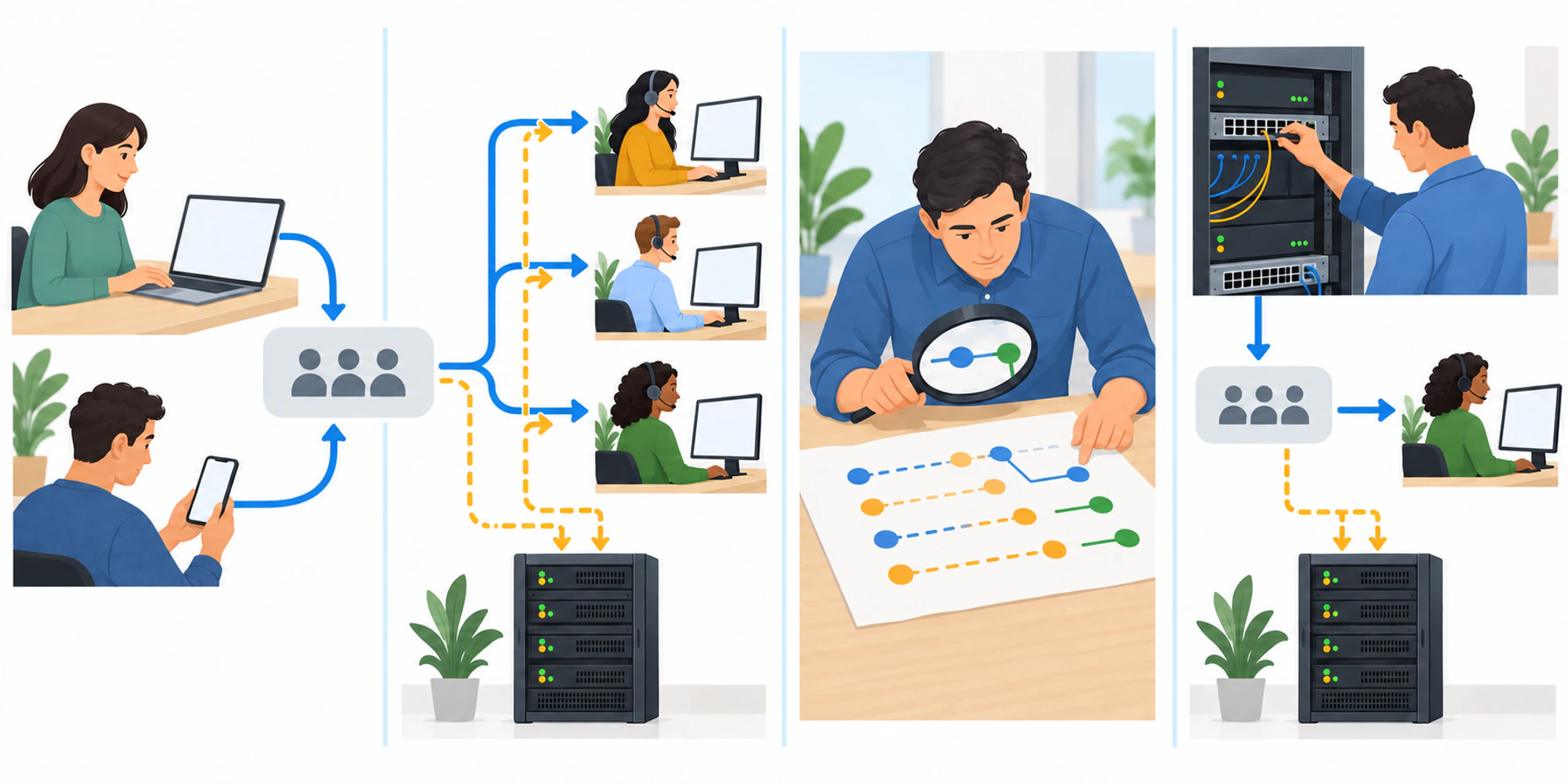
Treat those facts as an ownership design. Name the Dynamics administrator, the Azure owner, the trace reader, and the operations lead who accepts a routing result. Decide which environment sends data to which Application Insights resource.
Data ingestion is chargeable, so estimate volume and retention before enabling broad collection. Keep access narrower than the customer-service team itself. Routing evidence can reveal customer identifiers, employee actions, queue names, availability changes, and operational structure. Apply the same security controls used for customer history and employee analytics.
Run one known conversation
Choose a test that represents a real failure without using live sensitive content. Give it a known channel, queue, skill, priority, representative state, and expected owner. Record the start time and the identifiers your team is permitted to retain. Then send the work item through the normal path.
Do not change three rules while the test is running. One controlled case lets the team compare expectation with evidence. If availability may be involved, confirm the representative state using your agent availability audit. If capacity profiles may be involved, compare the accepted configuration with the capacity profile safety guide.
Use a small evidence receipt for every test.
| Evidence point | Owner | What must be recorded | Stop condition |
|---|---|---|---|
| Test input | Operations lead | Channel, queue, skill, priority and expected owner | The expected path is unclear |
| Export connection | Dynamics administrator | Environment and Application Insights destination | The destination cannot be proven |
| Trace search | Azure reader | Time window and permitted record identifiers | The test cannot be isolated |
| Routing result | Routing owner | Queue decision and rule version | The queue differs without explanation |
| Assignment result | Workforce owner | Availability, capacity, offer and acceptance | Ownership cannot be reconstructed |
| Acceptance | Service owner | Fix, retest and monitoring decision | No named person accepts the result |
Read routing and assignment separately
A conversation can enter the correct queue and still reach the wrong person. It can also enter the wrong queue before assignment begins. Keep those questions separate.
First trace intake, classification, and the route to a queue. Compare the actual attributes with the version of the rules that was active at that moment. Then inspect assignment. Check eligible representatives, skills, presence, capacity, offers, rejection or timeout, and final ownership. The related assignment rejection guide explains why an offer event is not the same as customer ownership.
Do not infer missing evidence. A blank result can mean the export was misconfigured, the search window was wrong, access was insufficient, or the work item never entered the expected environment. Prove the evidence path with a second known test before changing production routing.
The shared customer inbox can show current ownership and conversation history to the operating team. It does not replace platform telemetry. Use the inbox to understand the customer impact and diagnostics to explain the system decision.
Change one thing and retest
When the evidence points to a rule, skill, queue membership, presence, or capacity problem, change the smallest relevant item. Record who approved it and what could be rolled back. Run the same test again with the same expected path.
Compare the two receipts. The corrected test should reach the intended queue and owner, while the telemetry remains complete enough to explain why. If the test passes only because a supervisor manually intervened, the routing issue is not fixed. Manual action is evidence too, but it should be recorded as an exception.
Keep a short review cadence after launch. Look for unassigned work, repeated timeouts, unexpected queue changes, and unexplained manual assignments. Alerts should lead to an owner and a decision, not simply create another noisy inbox.
Retire the old evidence carefully
Microsoft's notice links a separate process for removing legacy routing-diagnostics data from Dataverse. Do not delete historical evidence merely because the old feature has been removed. Apply your retention policy, preserve records needed for active investigations or audits, confirm that the Application Insights path is accepted, and document what was deleted and by whom.
The goal is not to collect every event forever. It is to make one routing decision explainable from the customer request to the final owner. That is the standard to use whenever a rule, capacity profile, or workflow changes. If your team is redesigning ownership more broadly, connect this evidence model to the wider support operating model.
Frequently Asked Questions
Is Dynamics 365 unified routing diagnostics still available
Microsoft says the feature was removed on March 31, 2026. Use conversation diagnostics in Azure Application Insights for the supported evidence path.
Does conversation diagnostics fix a routing problem automatically
No. It records lifecycle evidence. An administrator or operations owner must interpret the trace, make a controlled change, and retest the same path.
What should a team test first
Start with one recent, repeatable problem whose expected queue and owner are known. Avoid a broad production change until the team can isolate that test and explain its routing and assignment results.
Want help applying this guide?Ask the DripTell team
From reading to action
Want help applying this to your business?
Share your details. We will read the article you are on and start with a useful answer for your team.
DripTell Editorial
Practical guidance reviewed by the DripTell product and customer workflow team.
See how DripTell checks product claims, uses primary sources and handles corrections.
Editorial and source policy

